Content board
Every video lives here as a card. Drag cards between columns as they move through the pipeline, or click a card to edit details. New footage from Tariq lands as a card in Filmed with a Drive link.
Posting calendar
Cards show up on their post date. Green means posted. Click any entry to open the card.
How we work
The loop from raw footage to posted on every platform. Tariq films, the editor makes it clean, everything ships through this board.
2026-09-04_biz-idea-day3. Include a voice note or text file if there is anything the edit must include.Posting spec per platform
| Platform | What goes up | Notes |
|---|---|---|
| Instagram Reels | 9:16 master, native upload | Caption with hook line first, 3 to 5 relevant hashtags max, tag mentioned brands |
| TikTok | 9:16 master, native upload | Slightly rawer captions work, use trending sound LOW under the edit only if the video allows it |
| YouTube Shorts | 9:16 master, native upload | Title = the text hook. Longform goes to the main channel with chapters |
| Facebook Reels | 9:16 master, native upload | Same caption as Instagram |
| X | Native video + a text version | Post the video natively AND write the idea as a text post or short thread. Text posts also stand alone on days without video |
| Threads | Text cross post | Reuse the X text version, adjust tone slightly, more casual |
The reference edit
9 seconds showing the locked look in motion: the hook animating in (staggered rise, lines one at a time, fades off at 3.5s) and a FIG card with the counter and bar filling. Match this energy and timing. Sound on, note the voice is untouched.
Delivery spec, every video
| What | Spec |
|---|---|
| Export | MP4, H.264, 1080 x 1920, 30fps (match source), CapCut bitrate on Higher, audio AAC 320kbps. Never CapCut's watermark options |
| File name | Same as the raw folder plus suffix: 2026-09-04_biz-idea-day3_FINAL_v1.mp4. Revisions bump the version: _v2, _v3 |
| Cover frame | One JPG per video, exported from the frame where the hook is fully on and the face looks good: …_COVER.jpg. Used for the IG grid and YouTube |
| Post caption | Drafted by the editor in the card notes before posting: line 1 = the hook, line 2 = one value or context line, then the CTA, then 3 to 5 niche hashtags. Lowercase, no corporate tone |
| Where | Video + cover into Drive → Deliverables, link + caption in the card notes, card to Review |
| Turnaround | 48 hours from card hitting Filmed. Blocked on something? Say so in the card notes the same day, never silently |
QC checklist, run before every delivery
- ☐ Hook on screen within the first second, 3 line format, no boxes, gone by ~3.5s
- ☐ Something happens every 3 seconds, no static stretch anywhere
- ☐ Captions: 1 word (2 max) per line, lowercase serif, gold emphasis on money and punch words
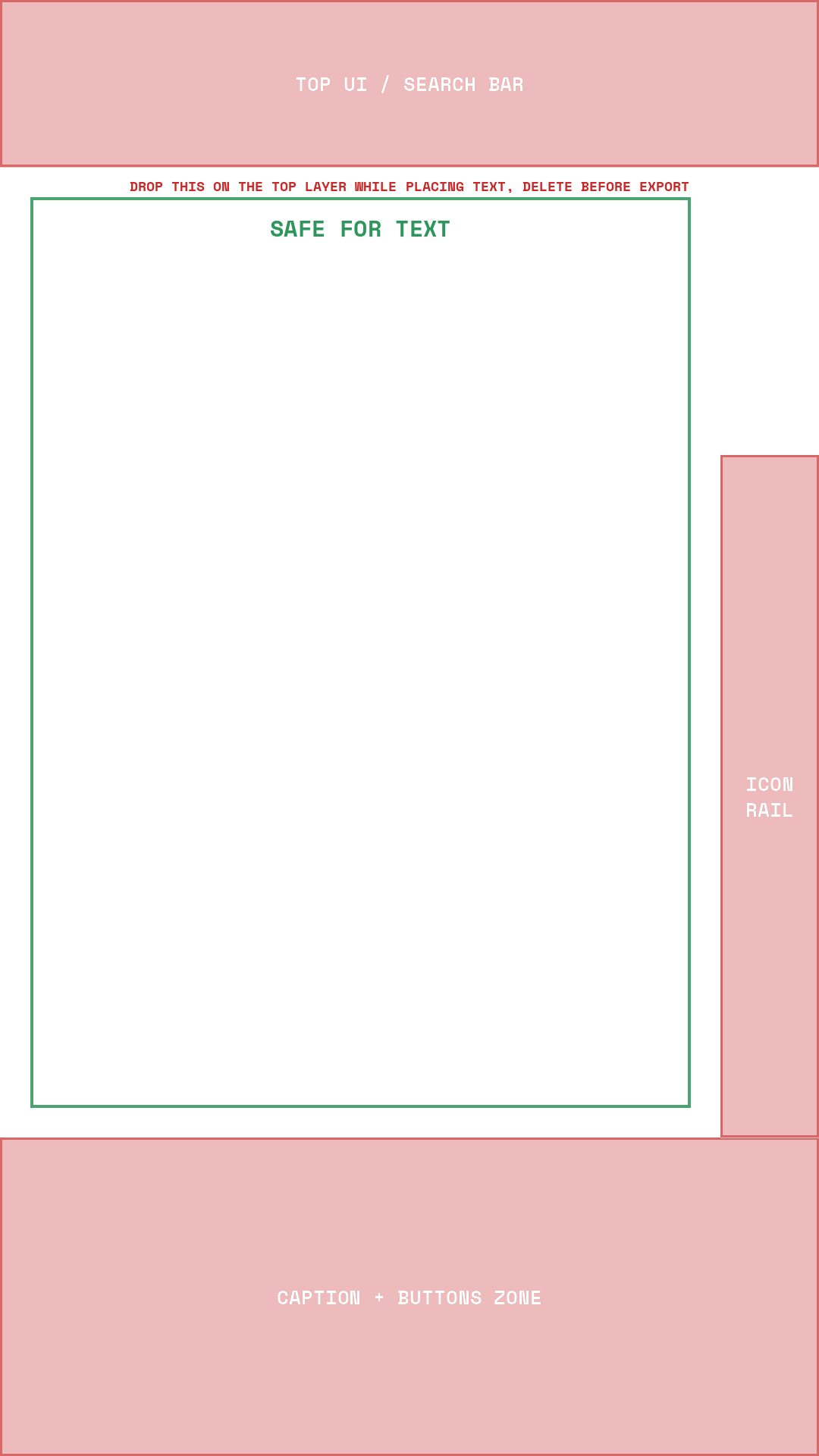
- ☐ All text inside the safe zones (download the safe zone overlay, drop it on the top layer while placing text, delete before export)
- ☐ Logo popped with SFX for every named brand or tool
- ☐ Reduce noise ON on every clip, nothing else touched on the voice, music and SFX under it
- ☐ Cuts tightened past the transcript pass, no dead air
- ☐ Length 25 to 45 seconds (55 absolute max)
- ☐ Ending loops or lands a payoff, no fade to nothing
- ☐ Export spec + file name + cover correct, zero watermarks
- ☐ Watched the whole thing ONCE with sound before sending
Feedback + revisions
Feedback comes as notes on the card, specific and timestamped where possible. One revision round is normal and included, fix, bump to _v2, back to Review. The board is the source of truth for status, anything urgent goes in the direct chat but the card gets updated either way.
Folders and access
- Google Drive — shared folder with RAW and FINAL inside. Link shared privately by Tariq.
- Surfshark VPN — connect to UK or US before posting anything. Login shared privately by Tariq, never stored on this site.
- CapCut Pro — the editing tool. Web checkout is cheaper than the app stores: 19.99 USD monthly or 179.99 USD per year which works out around 15 USD a month, 7 day free trial in some regions. Tariq covers or reimburses this, confirm before subscribing.
- Hera — for animated graphics moments. Login shared privately by Tariq.
- This site — edit access via the key button top right. Key shared privately by Tariq.
Brand kit
The look and the rules. Every video should feel like it came from the same person on the same channel. When in doubt, match the most recent approved video.
Colourway · the editorial system
Warm, calm, premium. Graphics live on cream, never on white. One accent colour per card, the rest stays ink and gray. On footage, text is white with soft gold for the emphasis words. No pink, no bright yellow, this replaces the old palette for all personal content.
Typography
| Use | Font | Rules |
|---|---|---|
| Hook lines 1 + 3 | Fraunces (Google Fonts, free) | Lowercase, weight ~520, white, optical size maxed. Soft shadow, subtle dark scrim behind the text zone, NEVER a box or border |
| Hook middle line | Shrikhand (Google Fonts, free) | The punch line of the hook, soft gold #F5D696, bigger than the other two lines |
| Captions | Fraunces, lowercase, white | Weight ~480, size ~78px at 1080 wide, lower third. Money amounts and punch words flip to Fraunces Black Italic (WONK on) in soft gold, slightly bigger |
| Small labels | Space Mono Bold (Google Fonts, free) | ALL CAPS, letterspaced. Episode tags, FIG. labels, axis labels, footers |
| Big numbers on cards | Fraunces 560 to 650 weight | Huge serif numbers. Always digits: $10,000 never ten grand |
Fonts to install
All free for commercial use. Download each, double click, Install Font, restart CapCut, pick by name. These are pre baked files because CapCut cannot adjust variable font sliders.
Originals if ever needed: Fraunces variable, Fraunces Italic variable, Space Mono Regular. Paid upgrade someday: PP Editorial New.
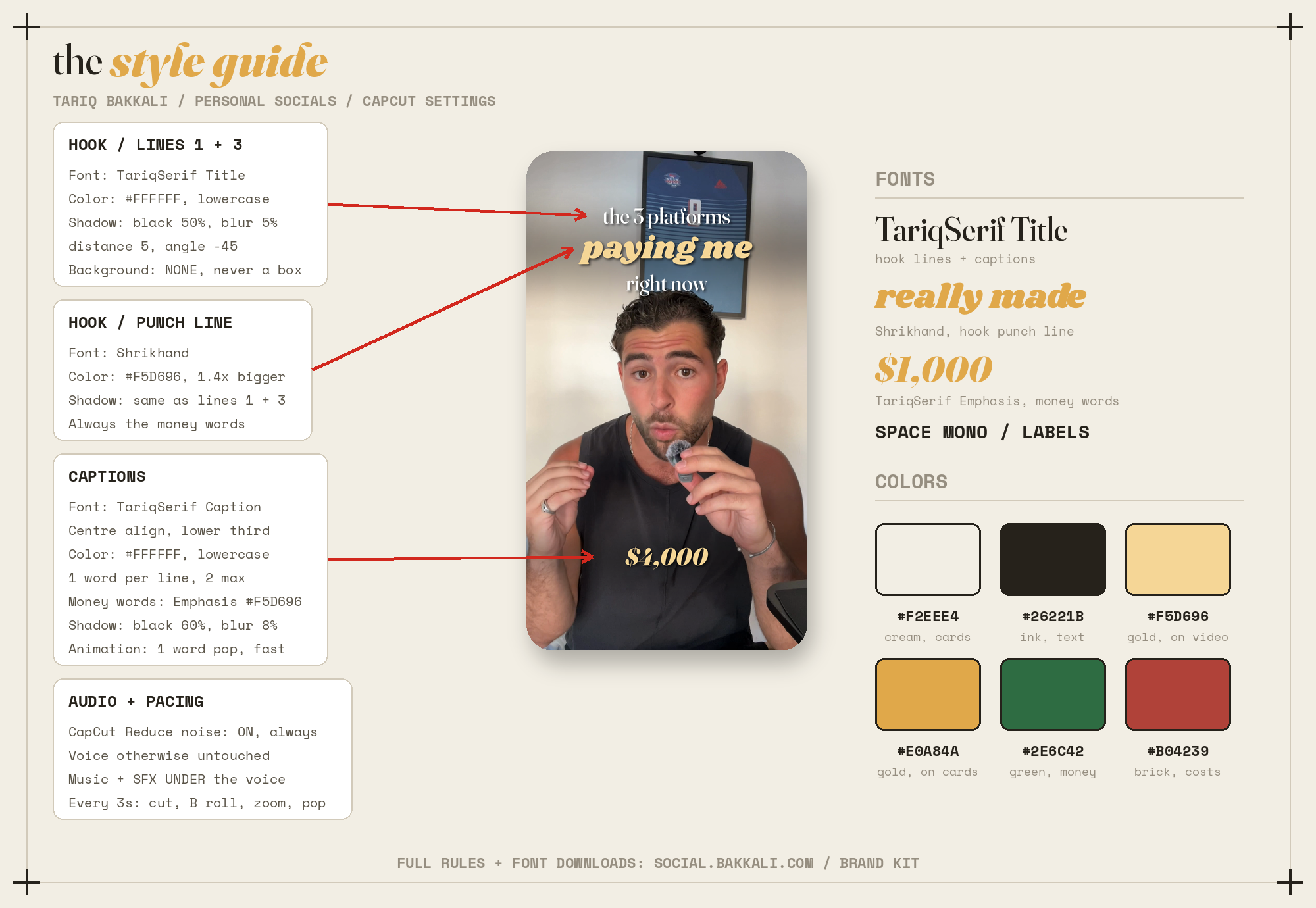
The style guide, one page
Everything on one poster: the mockup, exact CapCut values, fonts and colours. Download as PDF to keep next to CapCut.
Editor setup, step by step
CapCut settings, exact
Set these once, save each as a preset in CapCut, reuse on every video.
| Element | Setting | Value |
|---|---|---|
| Hook lines 1 + 3 | Font | TariqSerif Title |
| Color | #FFFFFF, lowercase text | |
| Shadow | Black, Opacity 50%, Blur 5%, Distance 5, Angle -45 | |
| Background | NONE. Never a background box on footage | |
| Hook middle line | Font | Shrikhand |
| Color | #F5D696, roughly 1.4x the size of lines 1 and 3 | |
| Shadow | Same as hook lines | |
| Captions | Font | TariqSerif Caption, centre align, lower third |
| Color | #FFFFFF, lowercase | |
| Lines | 1 word per line, 2 words max, timed to the voice | |
| Shadow | Black, Opacity 60%, Blur 8%, Distance 6, Angle -45. No stroke | |
| Animation | Monoline, 1 word pop or bounce, fast | |
| Emphasis words | Font | TariqSerif Emphasis, color #F5D696, slightly bigger than normal captions |
| When | Money amounts and the punch word of a sentence only | |
| Audio, every clip | Reduce noise | ON, always, unless the card says otherwise |
| Everything else | OFF. No EQ, no enhance voice, no volume rides. Music and SFX under the voice | |
| Small labels | Font | Space Mono Bold, ALL CAPS, white on footage, letterspacing up |
The locked look
Built examples. This is the target for every edit: text around Tariq on footage, and every stat as an editorial chart card.
Title style references
Frames pulled from a saved reference reel. The recipe to steal: content sits on a rounded card, a centered serif caption sits below it, and exactly one keyword per line gets swapped to a fat swash italic. This reel is where the whole system comes from, it is now THE look for titles, captions and cards.
Editing rules
- Reduce noise ON, always. In CapCut, enable Reduce noise on every clip of every video, unless the card says otherwise. No other processing on Tariq's voice: no EQ, no volume rides, no pitch or cleanup beyond that one toggle. Music and sound effects sit UNDER the voice.
- No boxes on footage. Text on video is always naked: soft shadow plus a subtle dark scrim behind the text zone. Never a card, pill, border or background box on footage. Cream cards exist only as fullscreen graphics.
- Captions: one word per line, two max. Never three or more words on screen in a caption. Timed word by word to the voice.
- Something happens every 3 seconds. The whole video, not just the open: a scene change, B roll, an object or logo popping on, a zoom, a graphic card, a caption emphasis moment. If any 3 second stretch has nothing but a static talking head, add something. This is the pacing rule the retention lives on.
- The hook, first second, always. 3 stacked lines centered in the upper third: line 1 lowercase serif white, line 2 the punch in Shrikhand gold and bigger, line 3 lowercase serif white. Text on the card tells you the 3 lines. Animate in fast (rise + fade, under half a second), hold roughly 3 seconds, fade out.
- Captions always. Lowercase Fraunces, white, lower third, one word (two max) per line. Money amounts and punch words flip to gold Black Italic slightly bigger. Mono caps in brackets for tiny asides only.
- Logos pop in. Any time a brand, app or tool is named, its logo pops on screen with a pop sound effect.
- Sound effects. Pop for overlays and logos, cha ching for money mentions. Like the Refly video. Do not overdo it, one effect per moment.
- Zooms. Punch in and out on emphasis beats. Subtle, roughly 110 percent, never disorienting.
- Cut by transcript first, then tighten by hand. CapCut's transcript editing (Edit by transcript) is THE method: delete dead words and bad takes from the text. But the transcript pass always leaves cuts too loose, so go back over the timeline and manually shorten them further, tighter and quicker than feels natural on first watch. Silence cuts only, never mid word.
- Masks and split screens when the format calls for it, for example tier rankings with Tariq on one side and the thing being ranked on the other.
- Graphics and charts follow the editorial system: cream background, thin corner ticks, a mono FIG. label top, serif headline with one swashy emphasis word, chart marks in ink with ONE accent colour, italic serif punchline under the chart, mono footer. Bars, donuts and progress lines all live on these cards. Numbers as digits.
- Length. Shorts land between 25 and 45 seconds. 55 is the absolute ceiling. Shorter beats longer.
- Endings. Either loop cleanly back to the start or land a payoff in the final second. Never fade out on nothing.
- Format. 9:16 vertical, 1080 x 1920 minimum, keep text inside platform safe zones (clear of the bottom 250px and right edge icons).
Sound: music + SFX library
Reference reels below list the exact tracks and effect packs we use. Editor: open each, download the assets they point to, keep them in a local library, use them per the rules.
Rules
- Music sits LOW under the voice, felt not heard. If you notice the song over the words, it is too loud.
- SFX mark moments: pop for overlays and logos, cha ching for money, whoosh for transitions. One effect per moment, never spammed.
- Nothing covers the voice. Ever.
Music references
- Trending IG audios — 6 tracks: Timeless, Broke in a Minute, Dragonfly, Luminary, Mysterious and Sad, Frank Saint. These are in app trending audios, add them inside IG or TikTok when posting.
- Background music folder — ~12 tracks by mood: emotional (Karen 3, New Home, Ylang Ylang), educational (ELBM, Dark Red, New Computers), ambient (CYHTM, Vivaldi Summer, Deep Space Samurai). Comment "background" on the reel to get the folder.
Sound effect references
- The core five: pop, whoosh, riser, camera shutter, magic reveal. Not mandatory on every single video, but they should show up a LOT, they carry the pacing. Every pack below repeats these, download once, keep a local SFX folder.
- Miracamp pack — Glass Shine, Drum Roll, Metallic Riser, Low Rise, Camera Charge, Bass Hit. Comment "SFX" on the reel for the folder.
- When to use what — pop for emphasis, whoosh for transitions, magic reveal for reveals, riser for tension, click or shutter on cuts. Pack via the comments.
- Placement tips — the same core five with tips on where they land in an edit.
- Sigma Editor pack 73 — Beep, Coins Money, Page Turn, A Few Moments Later, Glitch, Swoosh and more. Comment "Sound" for the link, free downloads at sigmaeditor.com.
- Exact filenames — fahhh (attention), popular-riser-metallic (build), mouse-click (text pops), vine-dramatic-boom (impact). Search those names, all free.
- 50 meme staples — Vine Boom, Cash Register, Correct Ding, Wrong Buzzer, Record Scratch, iMessage Send and 44 more. Use sparingly, one meme sound per video max, cash register fits money reveals.
Graphics tools: Hera + Claude Design
Animated graphics get generated with AI, then dropped into the edit. Two tools, one master prompt.
- Hera (hera.video): log into Tariq's account (login shared privately). FIRST set the aspect toggle in the top toolbar to Vertical (9:16), the prompt does not control the canvas. Then select the Tariq Editorial brand kit, paste the master prompt below, and describe the animation where it says NOW BUILD THIS. If you change the ratio later, re check the layout, elements drift.
- Claude Design (claude.ai/design): same flow, paste the master prompt then your request. There is also a Tariq Editorial Kit design system with the components pre built, select it from the design system picker when Tariq has shared the project with you.
- Always give real numbers and words in the request. The system bans placeholder decoration, every element must carry information.
Hera export settings
| Setting | Value |
|---|---|
| Resolution | 1080p (4k only if the animation is fullscreen for a long hold) |
| Format | MP4 for fullscreen cards. MOV + Transparent background Yes when the animation sits OVER footage, so CapCut keeps the transparency |
| Transparent background | No for fullscreen cream cards, Yes for overlays |
| Frame rate | 30 fps, always, matches the footage |
So the default export chip should read 1080p / MP4 / 30fps. Exported files go into the video's folder in Needs Editing next to the raw.
Inspiration board
Pinterest board: Tariq UGC socials design inspiration (short link: pin.it/6gORZ3LQr). Check it BEFORE building, not after. Use it by category:
| Category | What to pull from the board |
|---|---|
| Styles | Overall look references: layouts, colour moods, card compositions. Sanity check that your graphic would sit comfortably next to these pins |
| Text + titles | Title treatments, serif and emphasis pairings, how big type sits over footage |
| Captions | Caption placement, sizing and rhythm references |
| Animations | Motion references: how things enter, counters, reveals. Match the energy, not the exact effect |
| Music + sound | Vibe references for what plays under the edits, pair with the sound library above |
Both of us keep pinning into it. If a pin conflicts with the brand rules on this page, the rules win.
B roll + stock assets
Tariq's B roll library first, always: the shared B roll folder, organized by category, pull from there before anything else.
Free stock when the library does not cover it: Pexels · Pixabay · Unsplash. All free for commercial use, no credit needed. Stock clips get the same grade so they do not look pasted in.
Downloaders for reference assets: Klickpin (Pinterest pins and boards) · Snapinsta (Instagram and TikTok videos, for pulling the reference reels and sound packs above).
The master prompt
Copy the whole thing, paste it first, every time. Open as plain text
loading…
Accounts
| Platform | Handle |
|---|---|
| @tariqbakkali_ | |
| TikTok | @tariqbakkali |
| YouTube | @Tariq.Bakkali |
| Tariq Bakkali (page link shared privately) | |
| X | shared privately |
| Threads | via the Instagram account |
| Site | bakkali.com |
Content strategy
What we are doing, why, and how we will know it is working.
The objective
Build Tariq's personal brand into a distribution machine. Three payoffs stack on top of it:
1. UGC inbound. The UGC business already pulls DMs from people asking how it works and brands asking for videos. More reach means more inbound deals at better rates.
2. A future paid community. If enough people keep asking how to do UGC, that demand becomes a paid community or course. We validate it with content before building anything.
3. Launchpad for products. The sunglasses brand launches this month. Founder content gives it distribution from day one, and every future product gets the same head start.
The default video pattern
Most videos are educational and follow one spine:
1. CLAIM — a specific, bold, checkable promise. "If I was starting UGC from zero and had to make $10k, this is exactly what I would do."
2. PROOF — the receipts. Real numbers, dashboard, payouts. This is what separates it from every guru clone.
3. STORY — short context or storytelling beat that makes it human. Optional but usually worth 5 seconds.
4. STEPS — dead simple, step by step, one line each. The part people save.
5. CTA — follow, always tied to continuity: "I post this every day" or "day 4 tomorrow".
Not everything is this: the 30 day business ideas and the sunglasses founder videos have their own templates, all built into the script tool below. But when in doubt, educational spine.
Month 1: publish wide, learn fast
Month 1 is a range test. We publish across all pillars, watch what wins per platform, then double down in month 2. Judge formats on retention and saves, not just views. Nothing gets killed off one bad video, every format gets at least 3 shots.
Content pillars
| Pillar | What it is | Cadence |
|---|---|---|
| 30 Day Biz Ideas | Daily series. Premise: I keep building businesses that die from no distribution, so I am not building anything until it goes viral. One business idea per day for 30 days, audience follows the arc | Daily during the run |
| UGC and Money | How the UGC business actually works: earnings breakdowns, client stories, pricing, behind the scenes. The inbound driver | 2 to 3 per week |
| Sunglasses Founder | Build in public for the sunglasses launch: product, packaging, first sales, lessons | 1 to 2 per week |
| Rankings and Formats | Tier rankings, split screens, reaction style formats. The experiments bucket | 1 per week |
| YouTube Longform | 8 to 12 minute deep dives on UGC and making money with content. Each one gets cut into 3 or 4 shorts | 1 to 2 per month |
Volume targets
| Output | Target |
|---|---|
| Shorts published | 1 per day minimum across IG, TikTok, YT Shorts, FB |
| Raw batches from Tariq | 2 to 3 filming sessions per week, each producing 2 to 4 videos |
| X text posts | 1 per day, video days included |
| Threads | Cross post the X text daily |
| Longform | 1 to 2 per month |
What we measure
- Weekly review. Every Sunday: views, average watch time, saves, follows per video, comments. Per platform, per pillar.
- The signal metrics are retention past 3 seconds and saves. Views without retention mean the hook worked and the video did not.
- Inbound counts. DMs and emails asking about UGC or the products get logged, that is the money metric.
- Month 1 exit review. End of month: kill the bottom formats, double the top two, set month 2 volume.